ASRS v1.1 website embed
Brief 18‑item questionnaire with a six‑item screener to identify ADHD symptoms in adults. Provides Part A, Part B and total scores with evidence‑based cut‑offs for follow‑up.
For educational and informational purposes only. Not a substitute for professional diagnosis or treatment.


Get the code
- 1
Copy the embed code below
- 2
Paste into an Embed or Custom HTML block on your site
- 3
Add attribution — paste "Powered by CoralEHR" as text below the embed
<iframe src="https://www.coralehr.com/embed/adult-adhd-self-report-scale-asrs/?source=YOUR_SITE" width="100%" height="700" frameborder="0"></iframe> 
Platform install guides
 Squarespace +
Squarespace - 1 Open the page you want to edit and click Edit in the top left.
- 2 Click the + icon where you want the assessment to appear.
- 3 Select Embed from the block menu.
- 4 Click the code icon (</>) in the embed toolbar.
- 5 Paste the iframe code and click Apply.
- 6 If the embed looks cut off, click the block → set height to 900px.
- 7 Click Save in the top left.
 Wix +
Wix +
- 1 Open your site in the Wix Editor.
- 2 Click Add (+) in the left toolbar.
- 3 Go to Embed Code → Embed HTML.
- 4 Drag the HTML element to where you want it on the page.
- 5 Click Enter Code, paste the iframe code, and click Update.
- 6 Drag the bottom edge of the element to at least 900px tall.
- 7 Click Publish to go live.
 WordPress +
- 1 Open the page or post in the block editor (Gutenberg).
- 2 Click the + button to add a block.
- 3 Search for Custom HTML and select it.
- 4 Paste the iframe code into the block.
- 5 Click Preview to check it looks right, then Publish/Update.
 Webflow +
- 1 In the Webflow Designer, open the Add panel (+).
- 2 Scroll to Components and drag Embed onto the canvas.
- 3 Paste the iframe code into the code editor that appears.
- 4 Select the embed element → open Style panel → set height to 900px.
- 5 Click Publish to push changes live.
Other +
Other - 1 Open your website editor and navigate to the page.
- 2 Find the option to add custom HTML (often called "Code Block", "HTML Block", or "Custom Code").
- 3 Paste the iframe code.
- 4 Make sure the container is at least 900px tall.
- 5 Save and preview the page.

Troubleshooting
The embed is cut off at the bottom +
height value in your iframe code. For ASRS v1.1 we recommend at least 900px.
I see double scrollbars +
overflow: hidden or a max-height — remove those.
The embed won't load at all +
Email me the install packet
Get the embed code, attribution text, and step-by-step instructions for your platform delivered to your inbox.
Coming soon

Suggested copy for your site
Paste this blurb on your resources page alongside the embedded widget.
We offer the Adult ADHD Self‑Report Scale v1.1 (ASRS v1.1) as a free self-screening tool. This 18-question assessment takes about 5 min to complete and provides an instant score with clinical interpretation. It is not a diagnosis — please discuss your results with a licensed professional.
Downloadable assets
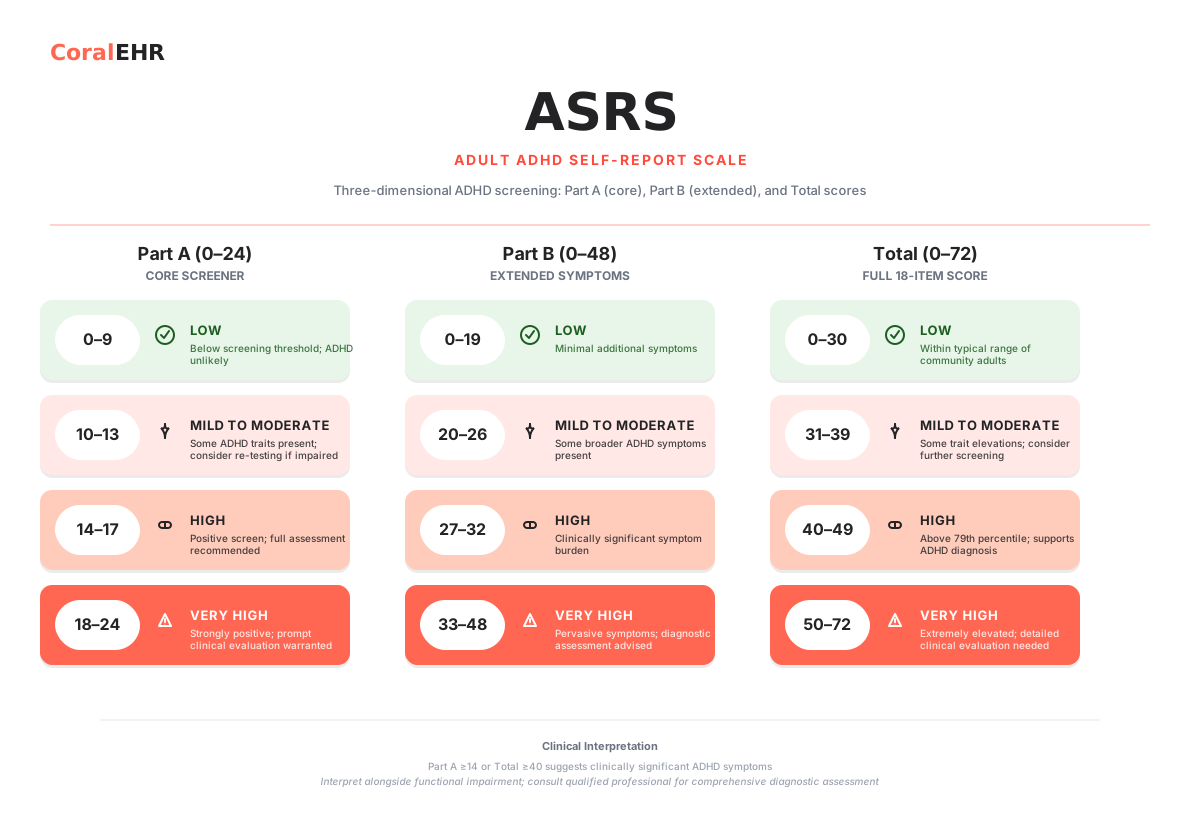 Scoring chart (ASRS v1.1)
These screening tools are for educational and informational purposes only. They do not constitute medical, psychological, or legal advice. Always consult a qualified healthcare professional for diagnosis and treatment.